Emacs for Cheating
If you, like me, rarely go through a day in which you don't spend at least some time typing away at a command line, there are certain commands you use so frequently that they migrate into your fingertips. The terse, cryptic syntax of the CLI tools eventually become as natural and frictionless as speaking. But even the tools you use every day likely support options that you never have a need for. Whatever your level of proficiency at the command line, it is gained not by mastering every command, or even any specific command. Rather, it is a matter of repetition, of learning what works for different situations that reoccur regularly, and of developing many individual habits that together constitute a skill set.
You learn ls and a few of the arguments that modify its
output, but you don't memorize the ls man page. And that is fine,
there is no need to remember every single argument that ls takes. If
you find yourself in need of something out of the ordinary, then you
bring up a man page and skim it for promising information, or just
ask your favorite LLM to search its vast stores of knowledge to
surface the right command for your situation.
Between the commands that you have made part of your repertoire through constant use and the ones you can track down when the need arises, there are the ones that you need in certain, specific situations. You don't use them enough to have them memorized, but when you do need them, it is for something important enough that you don't want to have to go hunting them down. These are the ones that got you out of some situation you never wanted to be in again, when something important has gone missing or some process is stalling and you don't know why. You remember last time there was that one command that fixed everything. What was it? How did I even find it? Was it in a man page, or something I found on Stack Overflow? Did I come across it in some obscure forum that no longer even exists?
What you need in this kind of situation is a cheatsheet, a place where you can stash all your useful code snippets to reference later when they are sorely needed. Fortunately, being the Emacs user you are, you have just the thing available! But as you would expect, making it work for you will require some time spent with configuration and learning key bindings.
Here we are going to talk about a specific feature of Emacs org-mode, called capture templates, that allows you to capture those useful commands and stash them somewhere they will be easily accessible just when you need them. But first a little background.
Org Mode
Emacs's org-mode defines a text markup format serving much the same purpose as the much more widely known Markdown. Like Markdown, an org-mode file consists of semi-structured text, including headers, text formatting, lists and links. So why not just use Markdown? It is after all basically the de facto standard of semi-structured text in the computing world, it is simple and widely supported, so why learn another markup language?
Org-mode is worth learning for the serious Emacs user because it is deeply entrenched in the Emacs ecosystem. Just as the obvious choice for a markup language everywhere else is Markdown, the obvious choice for Emacs is org-mode. Naturally, Emacs works with Markdown nicely as well, but org-mode is the standard in the Emacs world, and an Emacs user is well served by taking the time to learn it. Once you are comfortable finding your way around an org-mode file, you can then branch out into the myriad modes that use this format as the basis for all kinds of functions, from note taking to time tracking to writing and publishing.
Org-mode Capture
One of those useful extensions based on org-mode is the capture functionality. This is a simple function that allows you to quickly stash away notes in a known location for later review. This allows you to capture ideas, code snippets, links or anything else you don't have the time to explore or use immediately but which you don't want to lose track of.
Let's try it out. In Emacs, hit M-x org-capture. Assuming the
capture interface has not yet had any local configuration, you will
see a buffer with a few default options:
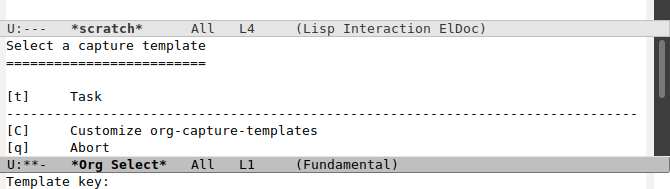
By default, your options are limited to capturing a "Task", opening the customization interface for org-capture-templates, or closing out the capture interface.
Let's try adding a task. Press t and you are
now in a new buffer with a header, a TODO item, a timestamp, and point
placed so that you can fill in a description of the task you are
adding to your list.

Hit C-c C-c to save your entry and return to whatever you were
previously doing. Your new task is now filed away for later. Where
exactly that is is determined by the value of the
org-default-notes-file variable, by default ~/.notes.
Pretty simple, pretty useful. Stash away tasks as you think of them for later with a few keystrokes. But this is Emacs, and so that is just the beginning of what is possible. Capturing tasks as you think them up is a useful feature, but you can easily imagine other pieces of information you might want to capture, in different places and including different information. And so org-mode provides a way to define your own capture templates. Let's look at how that is done.
Capture Templates
A capture template definition is composed of a set of values represented as a list:
- Keys: the key or string of keys you will press in the capture template buffer to select this particular template.
- Description: the text that will be displayed along with the selection key in the capture template buffer.
- Type: when capturing snippets, they can be inserted as new headings, list items, checkbox items, a row in a table or as plain text, each specified with a keyword value. We will focus on entering headings, for which the keyword is "entry".
- Target: specifies where in the template file the new captured text
should be placed. There are a number of possible options, the most
straight forward of which is to append it to a file specified with
the syntax
(file "path/to/file"). - Template: this is the actual string that will be inserted in the target location. Templates are "expanded" when inserted into a file, such that certain character sequences are dynamically replaced at the time it is inserted, using a kind of mini-templating language for specifying parameters such as where point is placed within the file, what text should be supplied by prompting the user, where timestamps should be inserted, and other options.
- Properties: a set of keywords that control various facets of how the capture template is handled.
Capture templates are specified as elisp lists, with the format
(key description type target template properties). There is much more to
each of these components of a capture template, and I refer you to the
official documentation for the complete description.
An Example
Let's say you regularly interact with a Kubernetes cluster using the
kubectl command. You just found out about the top subcommand,
which allows you to view the resources usage of Kubernetes nodes or
pods. You want to make sure that you have that command handy for later
should the need arise. You want to make it easy to remember how to
find it by putting it in a K8s cheatsheet, a place where all your
Kubernetes related code snippets can be filed away, to be pulled back
up when they are needed. You create a file named K8sCheatsheet.org
in your org-directory. In your init.el file, you add a capture
template definition to the org-capture-templates list:
  (add-to-list 'org-capture-templates
  	     '("k" "Kubernetes" entry
  	       (file "~/org/K8sCheatsheet.org")
  	       "* %^{Header}\n#+BEGIN_SRC sh\nkubectl %?\n#+END_SRC\n" :empty-lines 1))
The template string is a bit hard to parse because of the embedded templating language that specify certain aspects of how it gets inserted, but we will go over those shortly.
With this template definition available, hit M-x org-capture again
to bring up the capture template buffer. You now have a new option
available for capturing notes related to Kubernetes:

Hit k and you will be prompted to enter the header value for the entry,
which will replace the %^{Header} in the template string.
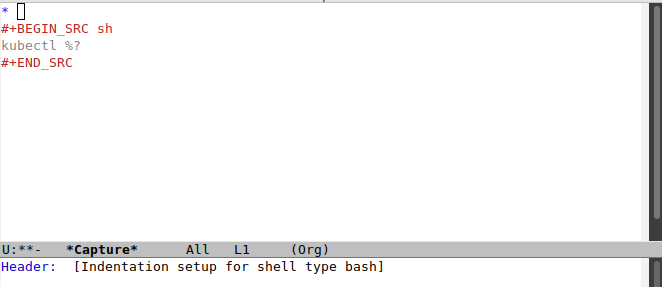
After entering a header, hit <RET> and point will be placed where
the %? is in the template. You can then complete the command.

Hit C-c C-c to save your change and close the template, popping you
right back to where you were. Now that snippet is available whenever
you need it.
So now we know how to capture a snippet of useful code for later use. You might be wondering what this interesting piece of the example is all about:
#+BEGIN_SRC sh
...
#+END_SRC
So now it is time to discuss…
Org-mode Babel
The next piece of this puzzle is Org Mode Babel. This is a set of functions that allow you to include snippets of code in an org-mode file, and more than that, to execute them from within Emacs. It has some of the characteristics of a Jupyter notebook, allowing you to embed blocks of code within text, and even to chain the code blocks together to create pipelines, and to include the output in the org-mode file itself for you to view and for further manipulation.
Before we go any further, you will need to access your init.el file
again and add the following, which will set up org-babel so that you
can run shell commands from within org-mode buffers.
  (org-babel-do-load-languages
   'org-babel-load-languages
   '((shell . t)))
You can include any number of the supported languages here, but for now we will just concern ourselves with the shell.
Bring up the previously saved K8sCheatsheet.org file, now with your
previously added snippet included:
* Display node CPU and memory usage
#+BEGIN_SRC sh
kubectl top node
#+END_SRC
Move the cursor over the command and hit C-c C-c. You will
be prompted to confirm that you want to run it. Enter
yes <RET> and the output appears below the command:
#+RESULTS:
| NAME   | CPU(cores) | CPU% | MEMORY(bytes) | MEMORY% |
| node1  | 480m       |   3% | 61971Mi       |     48% |
Note that the pipe characters between each column are inserted by org-mode, which recognizes that the output is in a tabular format and adds table formatting.
This is only the briefest introduction to org-mode Babel. Do some exploring and you will find a flexible framework with all kinds of possibilities, as you would expect from Emacs. You can query a SQLite database and pass the results to Emacs Calc. You can query a RESTful API and send the response to a Python program. It is enough here to demonstrate that not only can you include snippets of code in an org-mode file, but you can execute them from within it as well.
Conclusion
What we have demonstrated here is merely the tip of the Emacs iceberg. If this specific application intrigues you, there is plenty more digging you can do into org-mode, into its capabilities as a knowledge management format, into capture templates and code embedding with Babel, and plenty of other fruitful avenues of exploration. What I wanted to demonstrate here is how these various capabilities can be combined for the specific purpose of making it easy to capture snippets of code for later re-use, a practice I find useful and one more way in which Emacs supports my everyday work.